

Updating Sourcegraph
Supported on Enterprise plans.
This page is intended as an entry point into Sourcegraph versioning, upgrades, and the migrator service which manages our database schemas. Here we'll cover general concepts and direct you toward relevant operations pages.
If you are already familiar with Sourcegraph upgrades skip to instance specific procedures.
Note: For product update notes, please refer to the technical changelog.
General concepts
Upgrading
A new Sourcegraph release consists of updated images that incorporate code changes. It also includes modifications to deployment manifests in our supporting deployment repositories, such as our k8s helm repo.
When upgrading Sourcegraph, it is necessary to update and apply the deployment manifests. However, in addition to the manifest updates, it is crucial to ensure that all underlying database schemas of Sourcegraph are also updated.
Release Schedule and versioning
Sourcegraph versions have three numbers, for example v8.1.1335:
| Description | Version |
|---|---|
| major | 8 |
| minor | 1 |
| patch | 1335 |
Patch numbers are not sequential. Each minor release starts at patch 0, and later patch releases get a number based on the time elapsed since that minor release, so a higher patch number is always a newer release of the same minor version.
Sourcegraph ships one planned release each month, usually a minor release with new features and bug fixes, and patch releases with bug fixes between planned releases as needed. Major releases replace a monthly minor release and do not follow a fixed schedule. Each major release follows the final minor release of the previous major version; for example, v7.7 is the final v7 minor release before v8.0.
Sourcegraph supports the current major version and the previous major version. For the list of supported releases, see Sourcegraph Releases. For release notes, see the changelog.
Upgrade types
Sourcegraph has two upgrade types: standard upgrades and multiversion upgrades. Patch versions don't affect the upgrade type, and you should always upgrade to the latest patch of your target version.
Standard
- Moves Sourcegraph to the release immediately after your current version: the next minor version (
v8.0.xtov8.1.x), or the next major version from the final minor release of the previous major version (v7.7.xtov8.0.x). - Applies database schema migrations automatically with the migrator
upcommand when the new version starts. - Requires minor downtime, except on Kubernetes, where rolling updates are possible.
Multiversion
- Moves Sourcegraph more than one release forward (
v7.5.xtov8.1.x). - Uses the migrator
upgradecommand. Thefrontendservice and the migratorupcommand refuse to start when an upgrade crosses more than one minor version. - Requires downtime while migrator applies database schema migrations and completes unfinished out-of-band migrations.
- Supports upgrading from any supported release to the latest version. If you run an older version, contact support@sourcegraph.com before you upgrade.
| From Version | To Version | Upgrade Type | Notes |
|---|---|---|---|
v8.1.0 | v8.1.1335 | Standard | A patch release |
v8.0.x | v8.1.x | Standard | One minor version |
v7.7.x | v8.0.x | Standard | The final v7 minor release to the next major release |
v7.5.x | v7.7.x | Multiversion | Two minor versions |
v7.6.x | v8.0.x | Multiversion | v7.6 is not the final v7 minor release |
v7.5.x | v8.1.x | Multiversion | A major version and multiple minor versions |
Note:
- If you aren't sure how many releases separate your current and target versions, check the changelog or contact support@sourcegraph.com.
- Database schemas stay backward compatible with the previous minor version, so you can roll back one minor version without rolling back your databases.
Sourcegraph databases & migrator
To facilitate the management of Sourcegraph's databases, we have created the migrator service. migrator is usually triggered automatically on Sourcegraph startup but can also be interacted with like a cli tool. Migrator's primary purpose is to manage and apply schema migrations.
- To learn more about migrations see our developer docs.
- For a full listing of migrator's command arguments see its usage docs.
Best Practices
Caution: The upgrade process aggressively mutates the shape and contents of your database, and undiscovered errors in the migration process or unexpected environmental differences may cause an unusable instance or data loss.
It is highly recommended to:
- Take an up-to-date snapshot of your databases prior to starting a multi-version upgrade.
- Perform the entire upgrade procedure on an idle clone of the production instance and switch traffic over on success, if possible.
General upgrade procedure
Sourcegraph upgrades take the following general form:
- Determine if your instance is ready to Upgrade (check upgrade notes)
- Merge the latest Sourcegraph release into your deployment manifests
- Select an upgrade method:
- If updating more than a single minor version, perform a multiversion upgrade with the migrator upgrade command. This method requires downtime.
- If updating a single minor version, perform a standard upgrade with the migrator up command.
upis the default migrator entry command and runs onfrontendstartup.
- With upstream changes to your manifests merged, start the new instance
Note: For more explicit steps, specific to your deployment see the operations guides linked below.
Upgrade Readiness
Navigate to the Administration > Updates page. Here you'll be notified if your instance has any schema drift or unfinished out of band migrations.
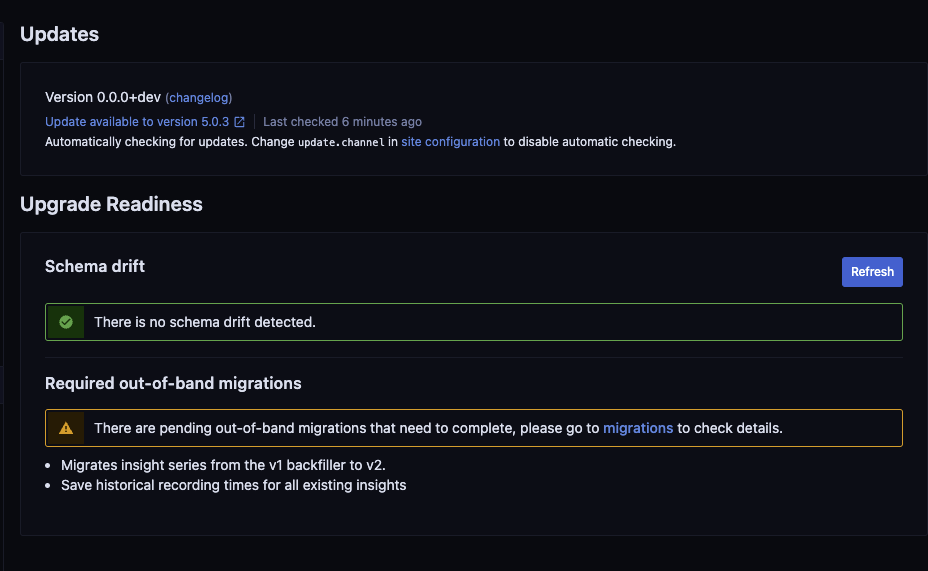
If your instance has schema drift or unfinished oob migrations you may need to address these issues before upgrading. Feel free to reach out to us at support@sourcegraph.com.
Instance Specific Procedures
Upgrades index
- Sourcegraph with Docker Compose
- Sourcegraph with Kubernetes